
How to set calling hours and holidays
Hours decide when the agent makes calls: dial lists, retries and callbacks. They follow your business time zone.
On the agent page click "Configure" and choose "Hours"
Mark the days the agent calls on
A day that is not marked shows as "Closed".
Set a start and end time for each day
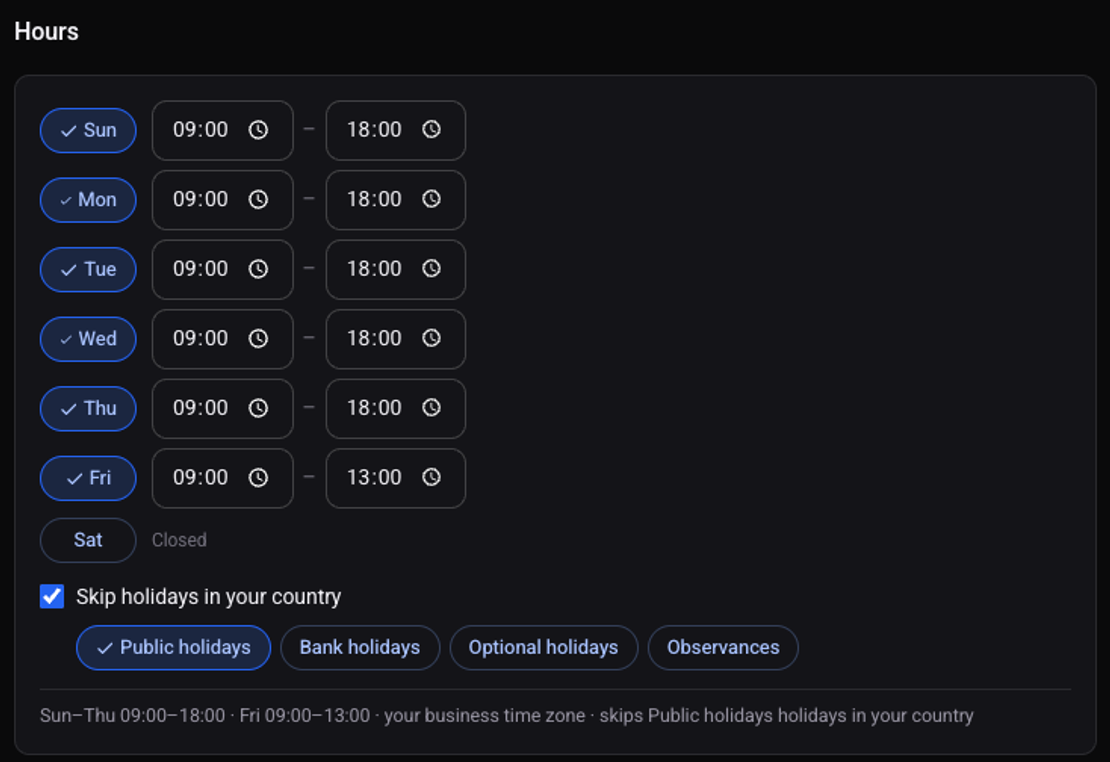
Tick "Skip holidays in your country" and choose which holidays
You can pick "Public holidays", "Bank holidays", "Optional holidays" and "Observances".
Click "Save changes"
The line at the bottom of the card sums up the days, times and holidays you chose.
Can a lead be called outside these hours?
Yes, on an API list. In the list's "When" row choose "As soon as the lead arrives, any hour". See how to set who, when and how many times the agent calls.
See also: how to add test numbers.