
How to switch an agent from test mode to live
Every new agent starts in "Test only". In this mode the agent calls only test numbers, so you can test it before it calls customers.
Open the agent page
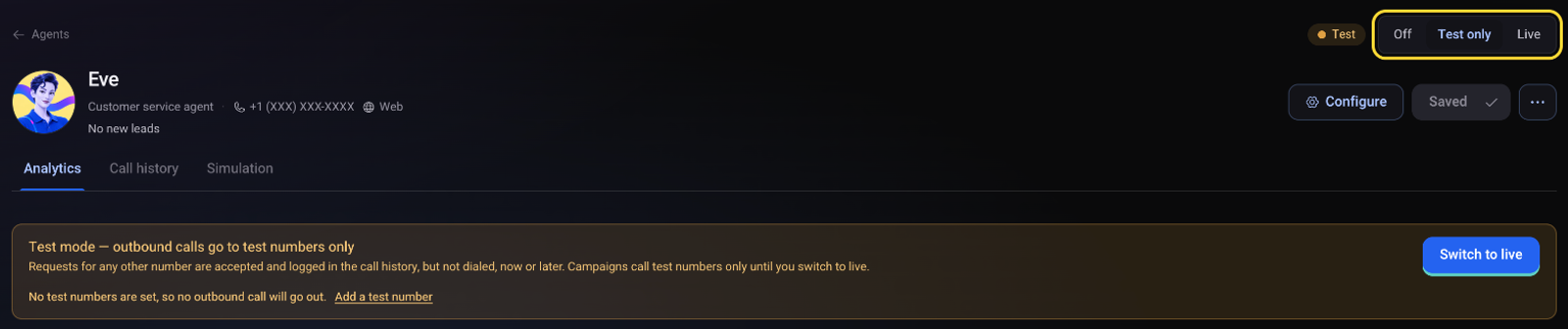
The top of the page shows "Test", with the banner "Test mode — outbound calls go to test numbers only" below it.
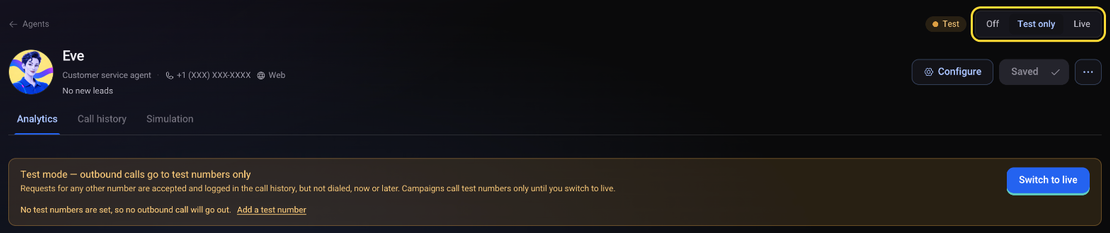
If there is no test number yet, click "Add a test number" in the banner and add your own number
Without a test number no outbound call goes out.
Send a lead with the test number from your system, and check that the agent calls and handles the call well
Click "Switch to live"
You can also choose "Live" on the switch at the top of the page.
Confirm with "Switch to live"
The top of the page shows "Live". From now on every new lead is dialed.
What works in test mode?
- Inbound calls and messages are answered as usual.
- A "Test call" from the agent settings goes to any number you enter.
- A lead with any other number is not dialed. It shows in "Call history" under "Not called", with the reason test mode.
- Through the API, a request for a number that is not a test number gets a
202response with the statusnot_dialed.
How do I put the agent back in test mode?
Choose "Test only" on the switch at the top of the agent page. To stop the agent completely choose "Off": see how to turn an agent off and restore it.
See also: how to make a test call and why a lead was not called.